PCM 6.2.5 Release Notes
A new Reprocess Count feature has been added to Notifications, allowing users to see how many transactions were included in each bulk reprocess request and how many are in progress, directly from the notification panel.
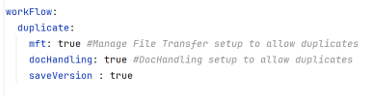
Customers can now save and manage versions of their Data Flows with the newly introduced versioning feature. When saveVersion is enabled in YAML, the system automatically creates a version whenever a data flow is created or updated. Users can add descriptions while saving, view all historical versions in the new Version History tab, and promote any previous version to become the Primary Data Flow. When saveVersion is disabled, only the current configuration is maintained without version creation.
In the application.yaml configuration file, under the workflow section, a new parameter saveVersion is introduced based on which the versioning of data flow is enabled or disabled.

Customers can now copy data flows with additional control by providing a new MFT filename and filter fields during the copy process. The specified filename and filters are automatically applied to all flows within the newly copied Data Flow, enabling faster setup and consistent configuration across Partner–Application combinations.
A new File Job Scheduler has been added to the Settings module, automating the movement of transaction records to the staging table and archived files to cloud storage based on retention rules and AWS configuration. The File Transfer Search references cloud storage, ensuring users can still view transaction details seamlessly.
Customers can now view file processing activity and application-level actions in two separate, dedicated tabs within the File Transfer Search Audit Info. The File Processing Activity tab displays all system-driven processing details, while the Application Activity tab shows user actions such as viewing, downloading, reprocessing, repicking, and redropping. This separation provides a clearer, more organized audit experience and improves overall usability.
Customers will no longer see user IDs or other sensitive information exposed in API URLs. The pcm/user/activity/userId API has been updated to send the value in the request body instead.
A fix has been implemented to prevent internal system details from being exposed to end users during workflow import operations. This enhances security and provides more consistent user experience.
PCM now incorporates Content Security Policy (CSP) headers, providing enhanced security against XSS, clickjacking, and unsafe resource loading by enforcing stricter rules on how front-end resources are sourced and executed.
Customers will no longer see sensitive information such as usernames or email addresses exposed in authentication responses; the login and forgot password flows now return generic, non-disclosing messages, preventing user enumeration and aligning with security best practices.
Customers can now configure cipher suites directly in the YAML file, providing flexibility to include newly introduced ciphers. If no ciphers are configured, the system will continue using the defaults ciphers for backward compatibility.
In the application.yaml configuration file, under the cd section, extra parameters are provided to include the Cipher Suites for the respective Security Protocol. If nothing is provided, the application will use the default ciphers.
Security vulnerabilities have been addressed by upgrading various libraries and dependencies, enhancing the platform’s overall security and reliability.